A webhook workflow event allows OneBlink apps to notify another application when a form submission has taken place. This can be used to create custom integrations with your own backend systems, middleware, or external services.
The webhook notification contains information that identifies the form submission, rather than the full submission payload. This keeps the notification fast and lightweight while giving you flexibility over what happens after the workflow event is triggered.
For example, you may use a webhook to update a status in your backend system, or you may use the submission details to request the full submission payload for backend processing or storage.
TABLE OF CONTENTS
Webhook Events
Webhook workflow events are triggered when a form submission is made. The webhook sends a JSON notification to the configured endpoint so your system can identify the submission and take the required action.
The notification does not include the full form submission data by default. If you need the full submission data, you can retrieve it after the webhook has been triggered.
Webhook Event Types
There are two types of webhook events available.
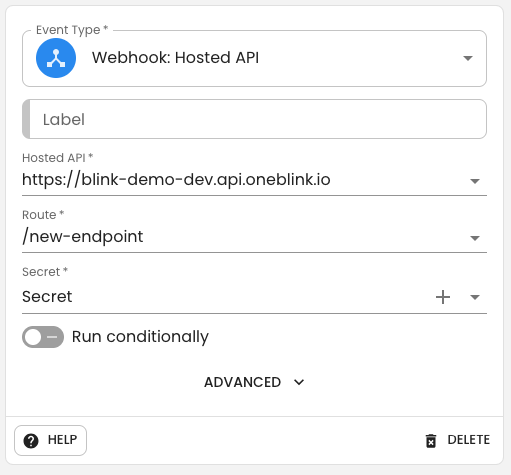
OneBlink Hosted API
If your webhook script is hosted on the OneBlink platform, select OneBlink Hosted API.
OneBlink API Hosting allows developers to write and deploy code without needing to manage infrastructure. APIs are hosted using serverless technology for resiliency and scaling.
After selecting OneBlink Hosted API, you will be shown a list of APIs. Once you select an API, you will then be shown the available routes for that endpoint.
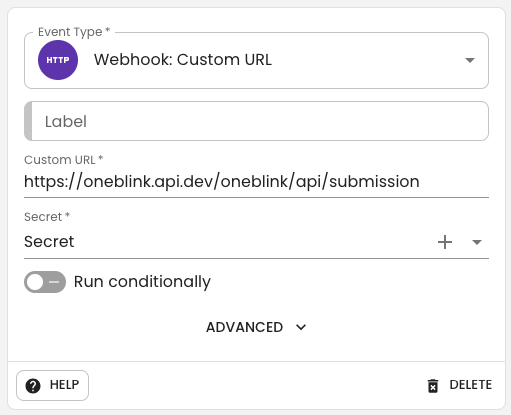
You will also need to configure a secret. For more information, see the Secrets article.
Retry on failure
If Retry on failure is enabled, the submission will be automatically retried 5 times. If all 5 retries fail, a notification email will be sent to the app sending email address.
Custom URL
If you are hosting your own APIs, or using middleware such as Jitterbit, Mulesoft, Boomi, or a similar service, select Custom URL.
Enter the full URL for your endpoint. OneBlink will send the webhook notification to this URL when a submission takes place.
Payload
The webhook payload contains information that allows you to identify the submission.
- formId: The ID number of the form that was submitted.
- externalId: An optional custom ID, if one was passed when invoking the form.
- submissionId: The ID for the submission.
- submissionTimestamp: An ISO 8601 timestamp for the time of submission.
The payload is passed as JSON data.
Payload Example
{
  "formId": 160,
  "externalId": "external identifier",
  "submissionId": "85fad0a4-b778-4aea-a6e7-671d84d58156",
  "submissionTimestamp": "2019-01-31T09:15:00.000Z"
}
Retrieving Form Data
Once your webhook has been triggered, you can retrieve the form submission data using the OneBlink SDK.
The SDK is written in NodeJS and can be included in your server-side code to retrieve submission data. It can also be used for other functions, such as pre-populating a form.
The SDK is hosted on GitHub and NPM, so it can be included in your projects.
Quick Tip: Pass the form submissionId to the getSubmissionData() function to retrieve the submission data.
Getting Help
If you need any assistance with Webhooks, please reach out through the Report Issue menu or email support@oneblink.io.
Was this article helpful?
That’s Great!
Thank you for your feedback
Sorry! We couldn't be helpful
Thank you for your feedback
Feedback sent
We appreciate your effort and will try to fix the article